


Product Updates | November 2026

by M. Watkins
· 5 min read
Since October, we've rebuilt Tape Trade to be faster and more reliable, made shared links much more personal, added timestamped comments and ZIP uploads, fully implemented search, and taught the mobile app to play offline and in your car.
Big Stuff
A faster, more reliable Tape Trade
We rebuilt our backend from the ground up for speed and reliability, and moved it to a new platform without any downtime for the apps. The web app also got much lighter. For the nerds: it downloads 55% less code on a first visit, and returning visitors re-download 89% less after an update. The tape animation appears the moment the page opens, with no blank screen or white flash in dark mode.
Player themes, custom colors and embeds
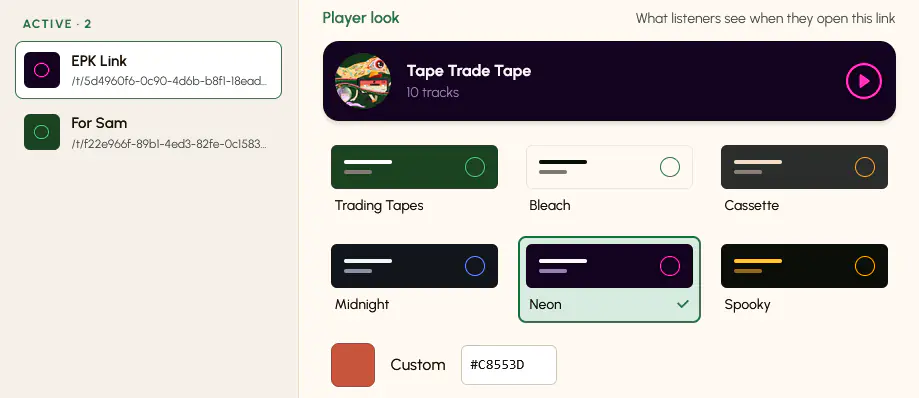
- Player themes for every Web Link. Choose a preset look for the player on each link, with a live preview as you pick.
- Custom player color. Pick any base color for a link's player. Tape Trade adjusts the text and controls so they stay readable, and an Improve button fixes low contrast in one click.
- Embed the player on your own website with a single line of code, copied from the new Embed section in Web Links. A Preview button shows how it will look on a page. Link expiry, passwords, revocation and the theme all still apply.
- Proper link previews. Paste a public Web Link into iMessage, Slack, WhatsApp, Discord or social apps and it shows the collection's title, description and artwork. This was way overdue. Password-protected and expired links still show the generic card.
- Choose your own web player theme for when you're signed in, in Settings → Appearance.
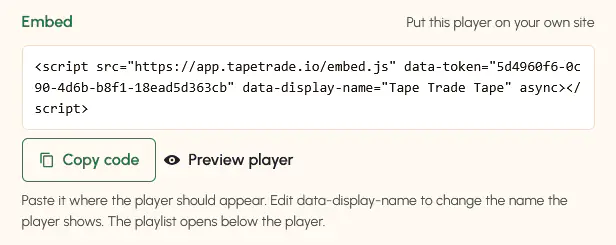
Try the embedded player below!
Timestamped comments
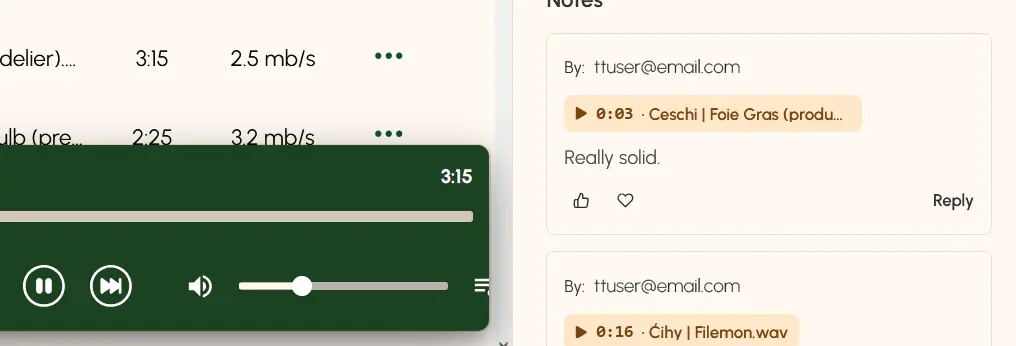
Attach a comment to an exact moment in a track. Clicking the timestamp plays the track from that point, and comment markers appear on the player's progress bar. Likes and loves on comments now show up instantly, too.
Upload a whole ZIP
Drop one ZIP of audio files onto a collection and Tape Trade unpacks it into tracks in the background, so you can leave the page while it works. Storage is reserved up front so you can't overshoot your storage, and if an import goes over the limit you can Remove tracks or Upgrade storage. Regular uploads also keep running while you move around the app, and each collection gets its own queue and progress.
Search is here
Search is now generally available on the web and in the mobile app, rebuilt from a few iterations that we were testing. It covers collections you own or that are shared with you, and their tracks. Searches start at 3 characters.
Collections
- Description on new collections. The New collection window now has an optional description field.
- Downloads start straight away. Downloading a whole collection now begins at once with a progress bar, and the file is named after the collection. Collections over the 30-track download limit get a clear message instead of an error.
- A faster dashboard. Your collection list loads much faster, and placeholder tiles now match the real ones so the page doesn't jump as it loads.
Player
- A new look for signed-in listeners. The player now uses the same floating card as Web Links, with more room for long track names.
- Animated "now playing" icon. The playing track shows a small animated equalizer; click it to pause. It stays still if you've turned on reduced motion.
Account and settings
- Redesigned Settings, with clear Playback and Appearance sections and simple on/off switches. Needle drop is now a single switch.
- Redesigned Account page: your plan, storage used, what's included and billing, all on one page.
- Delete your account from the web. Previously only the iPhone app offered this.
Sharing and subscriptions
When a collection owner's subscription ends, their public links and collaborator access pause, with a clear "This collection is unavailable" message. Nothing is deleted, and everything comes back as soon as the owner resubscribes. Owners never lose access to their own collections.
Security and privacy
We reviewed access controls across Tape Trade and tightened them in several places. We have not found any sign that these gaps were used.
- Private collections are private. Only a collection's owner and the people they've invited can open it, see its tracks or download it. Old-style short collection links (
/c/…) have been retired. Web Links are still the way to share a collection publicly, and they're unchanged. - Playback links, downloads and Web Link settings are now strictly limited to people who should have access, and public links no longer include any details about the owner's account.
Bug fixes
- The play button and drag-to-reorder in the player's queue work again, and next/previous no longer jump to the wrong track after a track is removed.
- On public Web Links and embedded players, playing a single track, adding one to the queue and jumping to a comment's timestamp all work again.
- Clicking play on a paused track resumes it instead of restarting it.
- Opening an invite link with an unknown or withdrawn code now explains what happened instead of showing a blank page.
- Password-protected Web Links are readable in light and dark mode with any player theme.
Mobile app
We've rebuilt the iPhone app natively for iOS. It's ridiculously fast. It will arrive as an update to the same App Store listing, and you'll keep your sign-in, downloads and settings. There are some big optimizations under the hood, and we did make some large UI changes to improve touch interactions.
Here are some of the specifics:
- Offline downloads. Download whole collections or single tracks and play them without a connection. Tracks you play are kept on your device automatically, and the oldest are cleared first when space runs low. Turn it on in Settings → Downloads, with a 5 GB cap and a Clear downloads button.
- CarPlay. Browse Collections and Shared from your car's screen, play or shuffle a collection, and control playback from Now Playing. Downloaded tracks play in the car too.
- Search for collections and tracks. Tapping a track opens its collection and highlights it.
- Redesigned Settings with the new Needle drop switch.
- The right words straight away. The app shows the correct text from launch, even offline or on a slow connection.
- iOS 15 or later is now required, following Apple's phase-out of iOS 14.
tapetrade.io
This website is new too. We rebuilt it on our own platform, added an FAQ and a contact form on the Support page, and made pages load almost instantly.
If you made it this far reading this, reach out and claim a prize.
Post by M. Watkins